• Skip to primary navigation
  • Skip to main content
  • Skip to primary sidebar

Patna Consultant

  • Home
  • About us
  • Services
    • BIFMA Certification
    • Virtual office service
    • Call Center License (DOT OSP license)
    • CE Certification
    • Chartered Accountant
    • CMMI Certification
    • Company Formation
    • Company Registration
    • Company Secretary
    • Contractor License
    • Copyright Registration
    • Cost Accountant
    • Digital Signature
    • DOT ISP License
    • e-tender consultant
    • Electrical Contractor License
    • EPF registration
    • ESIC registration
    • Factory License
    • FIRE License
    • FCRA Registration
    • Food License
    • FSSAI License
    • GMP Certification
    • GOST R Certification
    • Greenguard Certification
    • GST Registration
    • HACCP Certification
    • HALAL Certification
    • IEC Code Registration
    • ISI certification
    • ISO certification
    • OSP license
    • Kosher Certification
    • Joint Venture Registration
    • Labour License
    • LLP Registration
    • Multi State Co-operative Society Registration
    • Udyam Registration
    • NABH Accreditation
    • NABL Certification
    • NBFC Company Registration
    • NGO Registration
    • Nidhi Company Registration
    • NSIC Registration
    • Partnership Registration
    • Patent Registration
    • Pollution License
    • Producer Company Registration
    • Professional Tax Registration
    • Project Report
    • Proprietorship Firm Registration
    • PSARA License
    • PWD License
    • Rera Registration
    • ROHS Certification
    • SA 8000 Certification
    • Section 8 Company Registration
    • Shop Establishment License
    • Society Registration
    • Software Development
    • SSI MSME registration
    • Trade License
    • Trademark Assignment
    • Trademark Objection
    • Trademark Opposition
    • Trademark Rectification
    • Trademark Registration
    • Trademark Renewal
    • Trust Registration
    • Udyam Registration in Bihar
    • Website Designing
    • 12A Registration in Patna
    • 80G Registration in Patna
  • Contact Us

Recent Update

June 25, 2023 By Prince Kunal

Bihar Property Tax

Bihar Property Tax- The Municipal Corporation imposes property tax on real estate or property based on its value in Bihar. Individuals who own properties in the state are accountable for paying property tax to the Municipal Corporation, which is overseen by the Urban Development and Housing Department of Bihar. The amount of property tax levied on property is not the same in every state. This article examines the different elements of Bihar property tax thoroughly.

Uses of Property Tax:

Municipal Corporations in India rely heavily on property tax as a key source of revenue. Every residential, commercial, and industrial property located within the boundaries of a Municipal Corporation is subject to assessment and payment of property tax. This tax is imposed annually and must be filed on the same day each financial year by the property owner.

Eligibility Criteria: 

Individuals who meet the criteria specified by the state of Bihar are considered liable for paying property tax.

  • Someone who has reached the age of 18 or older.
  • Someone who resides permanently in the state of Bihar.
  • Every person who possesses a property in Bihar has the obligation to pay a tax for that property.

Exemption on Property Tax: 

Individuals who are not required to pay property tax according to section 136 are specifically identified as follows:

  • The Devasthan Department of the State Government takes care of the land or property.
  • Any location or asset utilized for communal prayer or communal function.
  • Land is reserved for the purpose of dealing with the burial of the dead.
  • Land dedicated by an educational institution exclusively for educational purposes.
  • Real estate intended for the purpose of public parks, public libraries, or public museums.

Property Registration:

The individual who is liable to pay property tax must first enroll their property by completing and submitting the property registration application along with the necessary documentation to the relevant Municipal Corporation authority.

Required Document: 

When paying property tax, the individual must provide specific information regarding their property tax invoice.

The method for paying Bihar Property Tax is quite simple. Firstly, individuals or entities owning property in Bihar should check with the local government body to determine the tax rate applicable to their property. Next, they can make the payment either offline at designated tax collection centers or online through the website of the Bihar government. It is essential to keep the payment receipt for future reference and any potential disputes. Failure to pay property tax in Bihar can result in legal action, so property owners should ensure that they are up-to-date with their tax payments at all times.

To complete the payment of property taxes through the internet in Bihar, adhere to the indicated procedures provided herein.

Step 1: Kindly visit the  official website The Bihar government’s Department of Urban Development and Housing.

In order to proceed, you must select the “Self Assessment and Payment of Property Tax” option from the Tax and Revenue section by clicking on the block provided.

Bihar Property Tax - Image 1Bihar Property Tax - Image 1 Bihar Property Tax - Image 1Bihar Property Tax - Image 1
Bihar Property Tax – Image 1

In the second step, the screen for citizen login will appear, and the person applying must choose their municipality and input their user identification and password. Afterward, they must click the “Submit” button.

Bihar Property Tax - Image 2 Bihar Property Tax - Image 2
Bihar Property Tax – Image 2

Next, carefully review the terms and conditions presented on the screen and mark the checkbox to signify your agreement to them before proceeding with filing your property tax return.

Instructed to proceed to Step 3, click on the tab that says “Click here to file self-assessment application.”

Bihar Property Tax - Image 3 Bihar Property Tax - Image 3
Bihar Property Tax – Image 3

Step number six involves selecting either the choice to modify the evaluation or to keep it as is.

For change in Assessment 

Choose the option of modifying the evaluation in Step 3.

In order to proceed, input your Property Number and Mobile Number, as well as the One-Time Password (OTP) that was sent to your registered mobile device.

Once your verification is confirmed, the system will offer you two choices to pick from.

  • Change in Contact Details
  • Change in Holding Details.

Step 4 involves selecting one of the suitable choices and then selecting the “Submit” button.

For change in Contact Details

Step 5 requires you to select the “In correspondence address details section” option located within the address details.

  • Next, the individual is expected to input the necessary information into the designated areas.
  • In the field where you input your correspondence address, include the address details of the property.
  • Type the property number in the designated field for property number.
  • Input the first line of the address into the designated field for address line 1.
  • Input the second line of the address in the designated field for address line 2.
  • Input the pin code in the designated pin code field.

In order to complete Step 6, the applicant must select the “Contact Details of Property Owner” section and provide the necessary information in the designated fields.

To save any updates made to your contact information, provide your phone number, cell phone number, and email address, then click the “Submit” button.

The message indicating the successful implementation of the modifications made during the Change Assessment process will appear.

For change in Holding Details 

In order to proceed to the thirteenth step, choose the option called “Change in Holding Details”. This will reveal three options: Addition, Alterations, and Partial Demolish. Choose one according to your needs and click the “Submit” button.

If you have selected the option to add information to the Holding Detail, then take the following steps to make the change:

To complete Step 7, tick the box next to the extra options located in the holding details modification menu and then click the “Submit” button.

In Step 8, complete the information relating to land or building details such as:

  • Choose the location of the property based on the road it is situated on, by selecting from the available options including the Principal main road, Main road, or Other Road.
  • Indicate the size of the land area in square feet on which the property has been built.
  • Please provide the constructed area of the property. It is anticipated that you will input the built-up area of the property.
  • You should select or deselect this option based on the availability of Rain Harvesting facilities for your property.
  • Choose one of the available options for connecting the property to a water source.
  • By clicking the “Add” button, a new row will be automatically created by the system to record the additional construction information of a property for the present fiscal year.
  • The system will calculate data based on the applicant’s selected values, but the applicant has the option to make edits.

Once you have entered the aforementioned details, select the “Next” option.

In Step 9, the system will prompt for payment, providing choices of making a payment online, offline, or in person at the ULB counter.

In Step 10, the Total payment amount can be modified by the user through the selection of the “Other Amount” option and subsequently inputting the preferred amount into the designated text box.

Once you have chosen your preferred payment method, the system will notify you that any modifications you made to the assessment have been successfully submitted. Click on the “Proceed” button to finalize the procedure.

Once you have chosen your preferred payment options, step 11 will lead you directly to the payment process.

Once payment process is done successfully, modifications will be implemented on your property information.

To make changes to holding details when partially demolishing, use the steps provided below:

  • Select the Partial Demolish choices offered in the Change in Holding Details option by marking the respective box and then proceed to click on the Submit button.
  • Enter the necessary information in the section designated for land or building details.
  • Choose the position of the property in terms of the road it is situated on, from the available options including a predominant major road, a major road, and other roads.
  • Provide the square footage of the plot or land upon which the property has been built.
  • Please input the constructed area of the property, referring to the area that has been built. It is anticipated that the user provides the property’s built-up area.
  • Depending on the availability of rain harvesting infrastructure for the property, you must select or deselect this option.
  • Choose one option for water connection for the property based on the available facilities.
  • The system will calculate data based on the information provided by the applicant. However, the applicant has the ability to manually make changes to this data.

Once you have completed providing the mentioned details, press the button labeled as “Next”.

At Step 12, you will request payment and have the choice between online payment, offline payment, or paying at the ULB counter.

In Step 13, the user has the ability to modify the sum of money that needs to be paid by utilizing the “Other Amount” choice and inputting the preferred amount into the designated text field.

Once a payment option has been chosen, the system will display a notification indicating that the modification made to the assessment has been successfully submitted.

To finish the process, press the “Proceed” button by following Step 14.

Step 15- involves being guided through the payment procedure based on the options you previously chose.

Once you have successfully submitted your payment, modifications will be made to the information related to your property.

Submit No changes in Assessment 

To make changes to your holding information, follow the steps listed below.

  • Choose the option of keeping the assessment as it is.
  • To view your property data, type in your property number and select the Submit button. Once submitted, the system will display all previous property-related information in View mode only. It is important to note that users cannot edit any information displayed. The system will provide information on the owner’s details, address, correspondence address, contact details, land and building details, and tax calculations.
  • By choosing the Other Amount selection and typing the desired value in the designated text box, the user is able to modify the overall payment sum.
  • The system will require payment and offers three choices: online payment, offline payment, or payment at the ULB counter.
  • Once you have chosen your preferred payment method, you will be directed to proceed with the payment process.
  • Once the payment process is finished, modifications will be applied to your property information.

Make Online Payment 

A set of instructions has been provided to enable online payment of property taxes.

Begin the process by filling out the necessary details in the form for either a change in assessment or no change. Opt for the online payment option under the payment mode section. Lastly, hit the “submit” button to complete the transaction.

Secondly, input the recipient’s name and phone number. The email address will be filled in automatically. Choose the bank and press the Reset button to remove all information regarding the payment.

In order to continue, click on the Pay button and then select the mode of payment you would like to use.

Bihar Property Tax - Image 4 Bihar Property Tax - Image 4
Bihar Property Tax – Image 4

Step number four requires you to choose the type of card you want to use and then input both the card number and name exactly as they appear on the card.

In Step 16, provide the three-digit CVV number located at the back of the card, and choose the expiry date of the card.

process. If you wish to terminate the Payment process, simply select the option to Cancel and it will cancel the payment.

Step 17: If you intend on processing your payment, select Pay Now to continue. 16. If you decide to terminate the payment process during the final stage, simply click Cancel to cancel it.

The applicant will be notified through their mobile number and email address when their transaction is successful and payment has been received.

Offline Payment Procedure 

Instructions have been provided to make payment of property taxes in person rather than through an electronic or online method.

Provide the necessary details on either the form for Change in Assessment or the form for No Change in Assessment.

Choose the Offline option from the Payment Mode selection in the first step.

In order to proceed, choose one of the available payment options: Pay by Challan at ULB, Pay By Challan at Bank, or Pay at ULB Counter. If selecting the Pay By Challan at Bank option, you will then need to select the name of the bank.

The user is provided with a list of banks in a drop-down menu from which they can choose to visit and make their payment. The specific bank that is selected is determined by the Corporation, Council, or Panchayat.

Proceed to the payment details screen by clicking on the Submit button.

The fourth step involves pressing the “Print Challan” button to obtain a physical copy of the Challan.

In step 18, the system will produce a challan on a different tab of your browser.

Step 19 involves printing out the Challan and taking it along with you to either your Corporation, Council, Panchayat or Bank in order to pay the required fee.

Step 20 involves paying by Challan at ULB. The applicant is required to pay in cash or by Cheque/DD/PO and then deposit the Cheque/DD/PO at the designated counters of Corporation/Council/Panchayat.

If the applicant chooses to pay at ULB, they must provide cash or a check/demand draft/postal order. Afterward, they are required to deposit the check/demand draft/postal order at designated counters of the Corporation/Council/Panchayat.

To complete Step 21, the physical versions of the digitally scanned documents must be handed in at the designated counters of the Corporation, Council, or Panchayat.

TM. Company. ISO. NGO. FSSAI.

Filed Under: Recent Update, Trending News Tagged With: Bihar Property Tax

June 25, 2023 By Prince Kunal

Bihar Domicile Certificate

Bihar Domicile Certificate

Bihar-Domicile-Certificate

A domicile certificate acknowledges an individual's place of residence in a specific state. It is granted by the revenue department of the Bihar Government. The certificate is utilized as evidence that the holder resides in the district or state where it was issued. This piece focuses on the steps involved in acquiring a Bihar domicile certificate.

The reasons for having a Domicile Certificate.

The domicile certificate is used to secure domicile or residence quotas in government services and educational institutions. This document is also required when applying for certain scholarship programs. Additionally, institutions that grant loans may require a domicile certificate for verifying the borrower's place of residence.

 Eligibility Criteria 

To acquire a domicile certificate from the Bihar Government, certain conditions must be met, which are referred to as eligibility criteria.

  • The person applying must have lived in Bihar for the last three years.
  • To be eligible, the candidate is required to possess a residential property, real estate or land located within the jurisdiction of Bihar.
  • The name of the candidate must be included on the voter registry.
  • Female applicants can apply for the  certificate if they are married  to a person from Bihar
  • For children, their certificate is granted based on the location of their parents' home.

 Documents Required to Get  A certificate of residency in Bihar.

In order to request a domicile certificate, a person must have the subsequent credentials:

  • An affidavit that is specified in Annexure-I of the domicile certificate application form.
  • passport, etc.) is required to avail of many government services. This helps to prevent fraud and misuse of government resources. The government has made it mandatory to link the Aadhaar card to various services such as bank accounts and mobile numbers to ensure that the benefits are accessible to the right person. It also helps in removing duplicate entries and ghost beneficiaries from the system. Therefore, having an identity proof is necessary to authenticate one's identity and avail of government services. To access various government services, it is necessary to provide proof of identity, such as an Aadhaar card, Voter ID card, or passport. This helps to prevent fraudulent activity and ensure that government resources are used appropriately. The government has made it obligatory to link Aadhaar cards to bank accounts and mobile numbers, among other services, to guarantee that benefits go to the correct individual. Furthermore, this process helps to eliminate duplicate entries and fictitious recipients from the system. Therefore, having valid proof of identity is imperative when claiming government services. Ration Card  , etc.)
  • Documents that confirm someone's place of residence, such as a bill for electricity, water or telephone.
  • A copy of the Birth Certificate
  • Proof of the applicant owning a land
  • Passport size color photograph

The process of applying for a Bihar Domicile Certificate can be done online.

To obtain a domicile certificate in Bihar, the candidate must adhere to the procedures outlined as under.

 Step 1:  To apply, the individual must go to the authorized website of the Bihar Government.this link.

Homepage-Bihar-Domicile-Certificate Homepage-Bihar-Domicile-Certificate
Homepage Bihar Domicile Certificate

 Step 2:  The applicant is required to select the " Apply Online”  option on the home page.

Terms-and-Conditions-Bihar-Domicile-certificate Terms-and-Conditions-Bihar-Domicile-certificate
Terms and Conditions

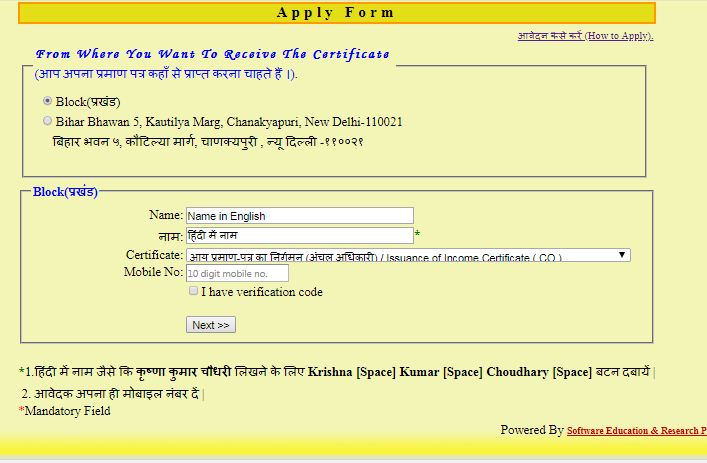
 Step 4:  The applicant is now required to select the location where they desire to receive the certificate.

Apply-Form-Bihar-Domicile-Certificate Apply-Form-Bihar-Domicile-Certificate
Apply Form

 Step 5:  Type in both the Hindi and English names, choose the appropriate certificate, and input the mobile phone number.

Application-Form-Bihar-Domicile-Certificate Application-Form-Bihar-Domicile-Certificate
Application Form

 Step 6:  After clicking on the “  Next” When you press the button, a code to confirm your identity will be sent to your mobile phone.

Applicant-details-Bihar-Domicile-Certificate Applicant-details-Bihar-Domicile-Certificate
Applicant details

 Step 8:  Once the application form has been completed, the applicant will be given an application ID as a confirmation and reference code.

Acknowledgment-Bihar-Domicile-Certificate Acknowledgment-Bihar-Domicile-Certificate
Acknowledgment

Track Application Status

The e-portalAdditionally, it enables its users to confirm the condition of the request. Simply click on the "homepage" button and select the relevant option. Application Status” Click on the provided link and subsequently input the unique application number in order to inquire about the current status of the application.

Application-Status Application-Status
Application Status

Download Bihar Domicile Certificate

website of the concerned authority and fill out the online application form. After the completion and submission of the form, the applicant must verify their identity and provide their address proof to complete the process. Once the verification is done, the domicile certificate will be available for download on the website. The process of obtaining a domicile certificate involves accessing the relevant authority's website and filling out an online form. The applicant must provide identification and proof of address after submitting the form. The certificate can then be downloaded once the verification process is complete and is available on the website.official web portal and click on the “  Certificate Web copy” You have the choice to download or print the domicile certificate online. You just need to input the application number and select the print button.

Download-Certificate Download-Certificate
Download Certificate 

Filed Under: Recent Update

June 25, 2023 By Prince Kunal

Startup Registration in Bihar

The Indian Government has launched Startup India with the purpose of creating a robust environment that fosters the growth of startups and innovation in the country. The ultimate goal is to support sustainable economic development and generate significant employment opportunities. The government plans to help startups progress through innovation and design so that they can thrive and succeed.

The goals of the Startup India Movement are listed as follows. The plan of action includes providing assistance to startups and much more.

  • and other facilities that support entrepreneurship, are crucial in facilitating the creation and growth of startups. These initiatives enable startups to access resources, mentorship, and networking opportunities that increase their chances of success. By providing a conducive environment for the development of innovative ideas, entrepreneurs are better equipped to contribute to the economy and society at large.
  • IPR (Intellectual Property Rights) facilitation, which involves making the process of filing patents easier.
  • A more favorable system of regulations, which encompasses advantages such as tax breaks, simplified adherence, streamlined company establishment, speedy procedures, and other benefits.
  • An objective to enhance the chances of obtaining financial support.
  • Offer an extensive network database to entrepreneurs and other individuals involved in the startup community.

Eligibility Criteria

In order to obtain the DPIIT Certificate of Recognition, the startup is required to fulfill the specified eligibility criteria.

  • Timeframe during which the entity has been in existence: The company must limit its lifespan and activities to a maximum of 10 years starting from the day it was established.
  •  Type of Entity:  The DPIIT Certification of Recognition is awarded to companies that are established as a Private Limited Company, a Limited Liability Partnership (LLP), or a Registered Partnership Firm.
  •  Annual Turnover:  In order to obtain the DPIIT Certificate of Recognition, the company must have generated an annual revenue of Rs. 100 crore for at least one fiscal year following its establishment.
  •  Original Entity:  In order to obtain the DPIIT Certificate of Recognition, the company must not have been formed by dividing or reconstructing an already established entity.
  •  Innovative Scalable Entity:  The organization needs to focus on enhancing or advancing a product, procedure, or assistance.
  • The organization needs to have a business model that can be expanded and holds the potential to produce substantial economic benefits, such as job creation and wealth generation. The company should possess the capacity to provide employment or promote financial prosperity.

Procedure to get DPIIT Certificate

The following easy steps should be followed by the entity in order to obtain the DPIIT certificate of recognition.

Incorporation of the Business

As mentioned earlier, prior to proceeding, it is necessary for the entity to establish the business structure as either a Private Limited Company, Partnership firm, or Limited Liability Partnership (LLP).

One can get their business registered with the Startup India Scheme, which is implemented by the Indian government to support and promote innovative startups. The government provides various benefits like tax exemption, easy access to funds, and a dedicated helpline for startups under this scheme. The registration process can be done online through the Startup India website, and the applicant needs to provide necessary documents like PAN card, certificate of incorporation, and business plan for the registration.

To obtain the DPIIT certificate of recognition, the startup must be enrolled under Startup India Scheme.

Apply for Start-up Recognition

In order to receive the DPIIT Certificate of Recognition for Startups, the applicant unit must go to the Start-up India Recognition portal and register with Start-up India.

Include the specific information required in the application for Start-up Recognition.

  • Details about the Entity: Description of the Entity's Characteristics, Field of Business, Type of Business, Classifications, as well as the Company's Identification Number and Date of Registration.
  • Full Address of the Entity
  • Details of the Authorized Representative
  • Directors or Partner Details
  • Details of Intellectual Property Right
  • Details of funding
  • Recognition received by the entity

Get the Startup Recognition Number

Upon scrutiny of the application and accompanying paperwork, the certification acknowledging startups from the DPIIT shall be bestowed.

After the ministry grants approval for the application and assigns a special recognition number for startups, they become eligible for registration with tax advantages.

Benefits for DPIIT Recognized Startups

Once a startup receives the DPIIT Certificate of Recognition for Startups, it can take advantage of the subsequent advantages.

Self Certification

Once the entity receives the DPIIT Certificate of Recognition for Startups, they will have the authority to certify their own compliance with three different Environmental Laws and six different Labour Laws.

Start-Up Patent Application

Startups that have been acknowledged by DPIIT are obligated to pay only 80% of the charges for obtaining patents, trademarks, copyrights, and designs. Additionally, the process of obtaining a patent quickly will be accessible for startups.

Easier Public Procurement Norms

  • Startups that have been acknowledged by DPIIT will have the chance to have their product featured on the Government e-Marketplace.
  • Startups that have been acknowledged by DPIIT are not required to provide an Earnest Money Deposit.
  • Newly launched companies are given a waiver for previous experience or revenue in all ministries and departments of the Central Government.

Easy winding up of Company

As per the Insolvency and Bankruptcy Code of 2016, a company can be liquidated within a span of 90 days after initiating insolvency proceedings.

Funds of Funds

The Alternative Investment Funds will provide funds of up to Rs.10000 crore for startups that qualify.

Credit Guarantee fund

Over a span of four years, startup companies have access to a Credit Guarantee fund of Rs.2000 crore through either the National Credit Guarantee Trust Company or SIDBI.

Tax Exemptions

  • Once the Certificate of Recognition is acquired, the startup may seek exemption from taxes under section 80 IAC of the Income Tax Act.
  • Startups that have been acknowledged by the DPIIT have the opportunity to request an exemption from Angel Tax.
  • Once a startup is recognized by the DPIIT and granted Tax exemption clearance, it will be free from income tax for a period of three fiscal years within its first ten years of existence.

Filed Under: Recent Update

June 23, 2023 By Prince Kunal

Bihar Trade License

Bihar Trade License

Bihar trade license is a certificate that gives permission to conduct a business or trade in a specific location. The state authorities issue these licenses to oversee and manage the operations of businesses and trades. This article discusses the steps involved in acquiring a trade license in Bihar.

Trade License

Bihar Trade LicenseBye-laws of Municipal Corporation of City stipulate that Bihar trade licenses will be issued based on location of commercial units. All establishments and shops situated within jurisdiction of Municipal Corporation of City are required to register within 30 days of starting their operations. The Regulation governs various aspects of conducting business in India.


  • The duration of time that an individual spends at work each day and each week.
  • The arrangements for extending work hours, breaks, designated start and finish times, days off, occasions for public and cultural celebration, and extra work hours.
  • Establishing rules that govern the employment of minors, individuals under a certain age, and females.
  • Guidelines and policies regarding compensated time off.
  • Guidelines and requirements governing job placement and dismissal.
  • Rules pertaining to the upkeep of documents and lists.
  • Responsibilities of both employers and employees.
  • Taking measures to prevent fire, mishaps, and other hazards.
  • Rules regarding the exhibition of announcements.
  • The duties of the employer and employee in relation to one another, the company, and the community.

Businesses Requiring Trade License

Trade licenses are required for any businesses that fall into the categories listed below.

  • A workplace or support system where individuals are hired or predominantly involved in clerical tasks.
  • An establishment that offers lodging, dining, or refreshments such as a hotel, restaurant, boarding house, cafe, or similar places.
  • A venue for public enjoyment and entertainment, such as a theater, cinema, or other similar area.

List of Required Documents

When applying for a Bihar trade license, you need to provide some documents and records alongside your application form.

  • Verification documentation: Individuals are required to present address proof and identity proof for verification purposes. These documents serve as evidence of the individual’s identity and residency. The address proof can be a utility bill or government-issued document, while the identity proof can be a passport, driver’s license, or another form of government-issued identification. The verification of these documents is necessary for various purposes, including opening bank accounts, applying for loans, or obtaining other types of legal documentation.
  • The company’s Certificate of Incorporation, Memorandum of Association (MOA), and Articles of Association (AOA) are essential documents.
  • A legal document such as a Lease Deed or Legal Occupancy agreement that includes the transfer of ownership from the Urban Local Body or any other authorized entity.
  • To conduct business in India, individuals and companies require a Permanent Account Number (PAN), which is a unique identification number assigned by the Indian government. For businesses, an incorporation certificate is also necessary as proof of the legal existence of the company. These documents are essential for conducting financial transactions and filing taxes.
  • Cancelled Cheque and Bank Statement

The procedure for obtaining a trade license can be completed online.

To obtain a trade license, candidates must adhere to the subsequent measures by completing and submitting the application form through an online platform.

Visit Nagar Seva Portal

 Step 1:  Applicants have to visit the  Nagar Seva Portal of Bihar To request a trade license using the portal.

Step 1 - Bihar Trade License Step 1 - Bihar Trade License

Step 1 – Bihar Trade License

 Step 2:  Subsequently, the individual seeking a trade license should select the ‘New Trade License’ alternative, which will redirect them to a different webpage.

Register and Login

 Step 3:  To use the License applications submitted by citizens, the applicant is required to access them using their individual username and password.

Step 3- Bihar Trade License Step 3- Bihar Trade License

Step 3- Bihar Trade License

 Step 4:  If you are a new user, you can sign up with the portal by selecting the ‘Register Here’ option.

Application form of Trade License

 Step 5: 

Step 5 - Bihar Trade License Step 5 - Bihar Trade License
Step 5 – Bihar Trade License

 Step 6:  Afterwards, the person applying must provide all of the required information, such as the details of their newly traded license, their personal address details, information on any other owners, the type of license they are seeking, details about their business, and information on any applicable fees. Once all of this information has been filled in, they can then submit it by clicking on the “Submit” button.

Step 6 - Bihar Trade License Step 6 - Bihar Trade License
Step 6 – Bihar Trade License

Fee Calculation

 Step 7:  To determine the necessary quantity, select the appropriate fee type, measuring parameter, and unit. Afterwards, click “submit”.

Step 7- Bihar Trade License Step 7- Bihar Trade License
Step 7- Bihar Trade License

Upload Requested Documents

 Step 8:  Complete the additional information section on the application form, attach the necessary documents, and then send the application.

 Step 9:  Once you have uploaded all of the necessary documents in scanned form, you should proceed to click the Submit button.

Verification of Documents

 Step 10:  After submitting the application, the ULB officials will verify the documents.

Generate Application Number

 Step 11:  Once the application form has been submitted successfully, a distinctive application number will be automatically generated.

Step 11 - Bihar Trade License Step 11 - Bihar Trade License
Step 11 – Bihar Trade License

Make LOI Payment

 Step 12:  Once the application is carefully examined, the authorized individual will create a Letter of Intent requesting the necessary fee from the applicant in order to issue the License.

Step12 - Bihar Trade License Step12 - Bihar Trade License
Step12 – Bihar Trade License

 Step 13:  The person applying will receive a message on their phone or an email stating the mobile number and email address that they registered to make the necessary payment.

 Step 14:  In order to complete the payment, all the information listed below must be provided.

  • UBL name
  • Collection date
  • Collection centre
  • Payment mode
  • Bank details
Step 14 - Bihar Trade License Step 14 - Bihar Trade License
Step 14 – Bihar Trade License

 Step 15:  Next, you will need to complete all the payment particulars that have been asked for.

 Step 16:  Next, select the Make Payment option to complete the LOI payment via the internet. An acknowledgement slip confirming the payment amount will be produced as a receipt.

After the payment has been received, the appropriate organization will verify the transaction and provide the Trade license.

The way to apply for a job is through the offline method.

Instead of applying for a trade license online, applicants also have the option to apply through physical means. To do so, applicants need to complete a series of steps when submitting the trade license application form offline.

Municipal Cooperation should be approached.

 Step 1:  To start with, the individual seeking a license must go to the licensing office within a specified municipal jurisdiction.

 Step 2:  To apply for a trade license, the individual must make a formal request to the executive.

The form for obtaining a trade license can be downloaded from Bihar’s official website.

Below, you will find a ready-to-use application form for the grant or renewal of a Trade License.

Page  1  /  1

 Step 3:  To complete the application, ensure that you accurately and correctly fill out the form with all required information provided. Enter the specific details requested and specified on the application form.

  • New traded license details
  • Applicant’s address details
  • Alternate owner details
  • Type of license

 Step 4:  In order to apply, you must provide the required documents and fill out the specified form in the manner deemed appropriate by the relevant party.

Attach Required Documents

 Step 5:  Following submission of the application, the individual must include the designated paperwork in addition to the application form, followed by payment of the requisite registration fee.

 Step 6:  After completing the submission process, the user will be sent a transaction number via the mobile number they registered. This message will provide details confirming that the registration was successful. It is necessary for the application to take note of the transaction ID so that the status of the registration can be monitored online.

Renewal of Trade License

The applicant can visit the  official portal In order to renew their trade license, individuals must click on the verification service tab and choose the ULB. From the dropdown services list, they must select the Renewal of Trade Licence option. Next, they need to input their Licence number and click on the chosen option. ‘Search’  button for the renewal of trade licence.

Renewal of Trade License - Bihar Trade License Renewal of Trade License - Bihar Trade License
Renewal of the Bihar Trade License is necessary.

Track/Check Status of Application

internet. By logging into their account on the company’s website, the applicant can check the current progress of their application and whether any updates or additional information is required. This convenient feature ensures that the applicant stays informed and up-to-date on their application’s status. official portal of Bihar To check the status of your application, follow a two-step process. First, select the tab labeled “Know your application status.” Next, enter your application number and click on the search button. The status of your application form will then appear on the screen.

Track/Check Status of Application - Bihar Trade License Track/Check Status of Application - Bihar Trade License
Monitor the Progress of Your Bihar Trade License Application

Download Certificate

Once your application form is authorized, you will be alerted on your registered mobile number. This will confirm that the data on your trade license has been updated in the relevant state records portal. To access the Certificate number and application number, you need to log in to the official website and submit the relevant details. After clicking on the submit button, you will be able to download your trade license certificate. You can also download a signed copy of the trade license as the applicant. Business License in Patna

Filed Under: Recent Update Tagged With: Bihar Trade License

January 31, 2022 By Prince Kunal

Website Designing In Rajapur Mainpura

We come stirring with the child maintenance for Website spread in Rajapur Mainpura, Web designing facilities in Rajapur Mainpura. We are web design company & web developer company in Rajapur Mainpura.

Website Designing In Rajapur Mainpura

WEBSITE DESIGNING IN Rajapur Mainpura

Websites are space on internet, where anyone can search for products or services of your company and open about your company. Web+Site= Site or space upon web. Means as soon as you have quarters at such and such place, similarly your company have address on internet where details of company can be log on and fetched upon. Websites have become very vital in today’s time. Due to massive growth in user of mobile phones and narrowing in price of internet data, online visitors of websites have increased manifold. Therefore, if you desire to spread around your business or desire to enlargement sales, you can not ignore having website of your company.

Importance of having website:

  1. Online marketing of company and its products
  2. Get right of entry to international customers
  3. Free marketing
  4. Unique and genuine enquiries
  5. Online Presence

 Types  of Website:

  1. Static Website: User can not change contents of website by himself. He will have to take help of developers.
  2. Dynamic Website: User can fiddle with contents of website without help of developers.
  3. Responsive Website: Website gets adjusted once screen size of various gadgets gone mobile, tablet, computers.
  4. E-commerce Website: You can sell products and facilities through this website. For example: amazon.com
  5. Directory Website: This website gives options to others to list their business. For example: Justdial.com
  6. Classified Website: This websites gives options to others to put ads. For example: Quikr.com

What is Website Designing?

Website Designing means designing contents, structure and see of the website.

What is Website Development?

It means developing committed functionalities of website like; user can login into website, add contents, add ads etc.

Call or whatsapp us at +91-8540099000 for getting any kinds of website.

Filed Under: Recent Update Tagged With: Website Designing In Rajapur Mainpura

January 31, 2022 By Prince Kunal

Website Designing In Punaichak

We offer Website enhance in Punaichak, Web designing facilities in Punaichak. We are web design company & web developer company in Punaichak.

Website Designing In Punaichak

WEBSITE DESIGNING IN Punaichak

Websites are space on internet, where anyone can search for products or services of your company and read about your company. Web+Site= Site or space upon web. Means bearing in mind you have quarters at such and such place, similarly your company have address on internet where details of company can be right of entry and fetched upon. Websites have become very necessary in today’s time. Due to massive accumulation in user of mobile phones and narrowing in price of internet data, online visitors of websites have increased manifold. Therefore, if you want to shout from the rooftops your issue or desire to enlargement sales, you can not ignore having website of your company.

Importance of having website:

  1. Online promotion of company and its products
  2. Get right of entry to international customers
  3. Free marketing
  4. Unique and real enquiries
  5. Online Presence

 Types  of Website:

  1. Static Website: User can not fine-tune contents of website by himself. He will have to accept help of developers.
  2. Dynamic Website: User can alter contents of website without assist of developers.
  3. Responsive Website: Website gets adjusted as soon as screen size of various gadgets past mobile, tablet, computers.
  4. E-commerce Website: You can sell products and facilities through this website. For example: amazon.com
  5. Directory Website: This website gives options to others to list their business. For example: Justdial.com
  6. Classified Website: This websites gives options to others to put ads. For example: Quikr.com

What is Website Designing?

Website Designing means designing contents, structure and see of the website.

What is Website Development?

It means developing energetic functionalities of website like; user can login into website, add contents, add ads etc.

Call or whatsapp us at +91-8540099000 for getting any kinds of website.

Filed Under: Recent Update Tagged With: Website Designing In Punaichak

  • Page 1
  • Page 2
  • Page 3
  • Interim pages omitted …
  • Page 1856
  • Go to Next Page »

Primary Sidebar

Our Contact Details

Call Us at:
+91-85400-99000
+91-85400-85000
+91-85400-78000
+91-90600-56000

Email Us at:
info@meerad.in
customercare@meerad.in

Visit Us at:
www.meerad.in
www.meeradgroup.in

Follow Us @ meeradindia
Tweet Us @ meeradindia

Address:

Delhi Address:

A98, A-Block, Bindapur Matiala Road, Beside Vagishwari World School, Nanhey Park, Uttam Nagar, New Delhi, India- 110059

Bihar Address:

First Floor, BSFC Building, Above ICICI Bank, Near Door Darshan, Fraser Road, Patna, Bihar- 800001

Jharkhand Address:

House No. 56, Opposite Thakkar Sweets, Near Chutia Police Station, Station Road, Ranchi, Jharkhand- 834001

Contact Us

Our Pages

  • About us
  • Contact Us
  • Home
  • Services
    • 12A Registration in Patna
    • 80G Registration in Patna
    • BIFMA Certification
    • Bio-Waste License
    • Call Center License (DOT OSP license)
    • CE Certification
    • Chartered Accountant
    • CMMI Certification
    • Company Formation
    • Company Registration
    • Company Secretary
    • Contractor License
    • Copyright Registration
    • Cost Accountant
    • Digital Signature
    • DOT ISP License
    • Drug License & Cosmetic License
    • e-tender consultant
    • Electrical Contractor License
    • EPF registration
    • ESIC registration
    • Factory License
    • FCRA Registration
    • FIRE License
    • Food License
    • FSSAI License
    • GMP Certification
    • GOST R Certification
    • Greenguard Certification
    • GST Registration
    • HACCP Certification
    • HALAL Certification
    • HOSPITAL LICENSE
    • IEC Code Registration
    • ISI certification
    • ISO certification
    • Joint Venture Registration
    • Kosher Certification
    • Labour License
    • Labour License in Bihar
    • LLP Registration
    • Multi State Co-operative Society Registration
    • NABH Accreditation
    • NABL Certification
    • NBFC Company Registration
    • NGO Registration
    • Nidhi Company Registration
    • NSIC Registration
    • OSP license
    • Partnership Registration
    • Patent Registration
    • Path Labs License
    • Pollution License
    • Producer Company Registration
    • Professional Tax Registration
    • Project Report
    • Proprietorship Firm Registration
    • PSARA License
    • PWD License
    • Rera Registration
    • ROHS Certification
    • SA 8000 Certification
    • Section 8 Company Registration
    • Shop Establishment License
    • Society Registration
    • Software Development
    • SSI MSME registration
    • Trade License
    • Trademark Assignment
    • Trademark Objection
    • Trademark Opposition
    • Trademark Rectification
    • Trademark Registration
    • Trademark Renewal
    • Trust Registration
    • Udyam Registration
    • Udyam Registration in Bihar
    • Virtual office service
    • Website Designing
  • Home
  • About us
  • Services
  • Contact Us

Copyright © 2026 · Meerad Business Solutions Private Limited